Event Mechanism
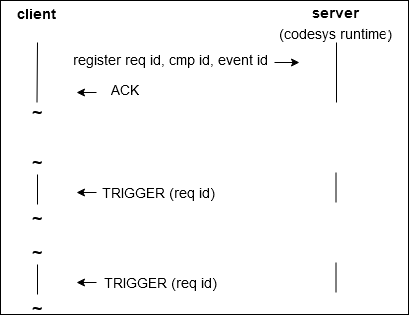
The runtime system uses "events" to communicate events such as the Start/Stop/Reset of the PLC, the occurrence of an exception, and so on. With the "event mechanism", it is possible to receive a message as soon as a selected event has been triggered.
The following application-related events are forwarded:
EVT_StartDoneEVT_StopDoneEVT_ResetDoneEVT_ExitDoneEVT_AllBootprojectsLoadedEVT_CmpApp_ExceptionEVT_StateChangedEVT_CmpDevice_InteractiveLoginEVT_CmpMgr_LicenseStateSysGraphic_EVT_OpenKeyboardSysGraphic_EVT_CloseKeyboard
The delivered uds_events.py sample provides the CODESYS_EventHandler class which implements the registration to an event.
This class needs the eventid as well as the componentid of of the event to be registered, which are stored in the liEvents list:
liEvents = {
    "CmpApp_EVT_StartDone" : (0x00000002, 0x10000 + 2),
    "CmpApp_EVT_StopDone" : (0x00000002, 0x10000 + 4),
    "CmpApp_EVT_ResetDone" : (0x00000002, 0x10000 + 6),
    "CmpApp_EVT_ExitDone" : (0x00000002, 0x10000 +  15),
    "CmpApp_EVT_AllBootprojectsLoaded" : (0x00000002, 0x10000 +  25),
    "CmpApp_EVT_CmpApp_Exception" : (0x00000002, 0x00080000 + 28),
    "CmpApp_EVT_StateChanged" : (0x00000002,0x10000 + 43),
    "CmpDevice_EVT_CmpDevice_InteractiveLogin" : (0x0000000E, 0x00010000+ 1),
    "CmpMgr_EVT_LicenseState" : (0x00000001, 0x00010000 + 9),
    "SysGraphic_EVT_OpenKeyboard" : (0x00000142, 0x00010000 + 1),
    "SysGraphic_EVT_CloseKeyboard" : (0x00000142, 0x00010000 + 2,
}
Moreover, a callback function has to be specified which will be called when the event occurs:
def callbackfunction_start(componentid, eventid):
    print("Start event occured")
Within Main, an event is registered as follows and the necessary callback function is specified:
componentid, eventid = liEvents["CmpApp_EVT_StartDone"]
myEventHandler_Start = CODESYS_EventHandler(componentid, eventid, callbackfunction_start)
myEventHandler_Start.start()
Now the callback function callbackfunction_start is called as soon as the runtime system has changed to Start.
Using the provided example which registers the EVT_CmpDevice_InteractiveLogin event, a wink can be triggered in the CODESYS development dialog and the corresponding event is forwarded to the sample script. If this event is not registered, then the usual error message "PLC Wink failed" is displayed.
When the EVT_CmpDevice_InteractiveLogin event is registered as in the example, the wink signal is forwarded to the Python script and users can implement their own functionality for it. The example simply outputs the "PLC Wink event occurred" message.
The CmpApp_EVT_StateChanged event can be used to implement a status LED. This event sends a message which contains the application name and the application status (RUN), STOP, etc.). The provided example outputs the application name and the current application status. "Application: Application Status: STOP"
Important
This event is sent only in the case of a status change. Therefore, when the sample Python script is started after the PLC application, the initial status is unknown.
The underlying mechanism is shown in the following figure:
Usage of the interface only as a member of the Linux | Yes |
Process separation | Yes |