Managing OPC UA Certificates
Encryption with certificates
To manage the certificate on the controller in the programming system, a configuration is required in the Security Screen view. To do this, install the CODESYS Security Agent add-on, if necessary.
Important
The use of certificate chains is recommended. In this configuration, intermediate CA certificates do not have to be stored and updated in the certificate store on the runtime system. As a result, this usually means that no configuration changes are required on the PLC when a client certificate is renewed or exchanged.
Generating a certificate for the OPC UA Server
In order to exchange data securely and encrypted with the client, the OPC UA Server requires a certificate. When the connection is established for the first time, the client must classify this certificate as trusted.
In the programming system, open an OPC UA Server project. Start the applicable runtime system on the controller. In the device editor, browse the network and connect to the desired target system. The active path to the controller is set.
The connection is active and green.
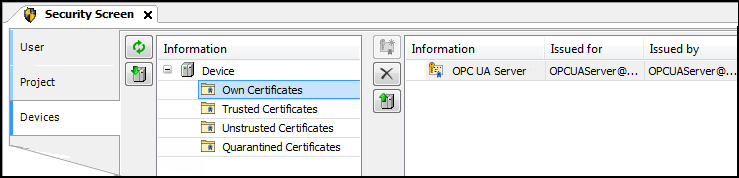
Click the View → Security Screen command.
Switch to the Devices tab.
In the left view (under Information), select your device.
In the right view, all services of the controller which require a certificate are displayed.
Select the OPC UA Server service.
Create a new certificate for the device. To do this, click the
 icon.
icon.The Certificate Settings dialog opens.
Define the certificate parameters and click OK to close the dialog.
The certificate is created on the controller.
Restart the runtime system.
Install trusted CA certificates for the OPC UA Server
When an OPC UA Client has a certificate from a trusted Certificate Authority (CA), this CA must also be registered as trusted in the OPC UA Server. Then the CA is installed under "Trusted Certificates".
To install certificate revocation lists (CRL of the CAs, the following steps are required:
Transfer of the
CRLs per file transfer into thecert/importdirectoryRun the following PLC shell command:
cert-importcrl
Using certificate chains
In version 3.5 SP22 and higher, both the OPC UA Server and the Client support the validation of certificate chains transmitted via the OPC UA protocol by default.
If a client transmits the certificate chains when the connection is being established, then no additional manual configuration of intermediate CAs is required.
In case the OPC UA Clients used do not transmit the certificate chains via the OPC UA protocol, manual configuration of the intermediate CAs is required.
For this to work, the certificates of the intermediate CAs must be installed separately. They are copied to the
OPCUAServer/Intermediatedirectory on the PLC via file transfer. After the transfer, these certificates are automatically used by the OPC UA Server.
Sending certificate chains
In version 3.5 SP22 and higher, both the OPC UA Server and the OPC UA Client transmit complete certificate chains by default – if possible – when establishing a connection.
For more information, see the following: Certificates on the PLC
Certificate chains are used when a CA-signed certificate has been created for the OPC UA Server or Client and the corresponding intermediate CAs are set up on the PLC. This is currently done by installing a PKCS#12 container (.p12i file), which can contain the complete certificate chain. A PKCS#12 container is a protected container for the private key and certificates.
In the event that certain OPC UA applications cannot process certificate chains correctly, it is possible that the transmission of certificate chains by the OPC UA Server (and Client) is disabled. For this to work, the device security setting SendCertificateChains of the OPC UA Server (or Client) must be set to NO.
For more information, see the following: Device Security Settings (OPC UA Server)