OPC UA Client
Important
UAExpert provides a professional OPC UA Client which can be used to connect to an OPC UA Server. UAExpert is an OPC UA Client tool from Unified Automation. It is often used in industrial and automation environments to test, configure, and visualize the data of an OPC UA Server.
For more information, see the following: Unified Automation
Setting up an encrypted connection to the UAExpert client
The "UaExpert" OPC UA Client is freely accessible software that you can download from the Internet. You can use this client to connect to the CODESYS OPC UA Server. The following description refers to this program. Other OPC UA Clients work in a similar way.
Start the UaExpert program.
Click the command.
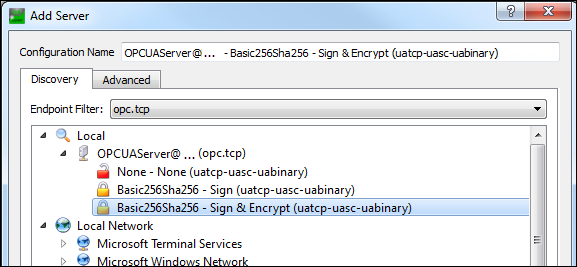
The Add Server dialog opens.
In the tree view, expand .
Select the connection type Basic256Sha256 – Sign & Encrypt (uatcp-uasc-uabinary) and click OK to close the dialog.
Click the command.
The Certificate Validation dialog opens with an error message.
Select the Accept the server certificate temporarily for this session option and click Continue.
In CODESYS, click the
 symbol.
The view is refreshed.
Select the Quarantined Certificates folder.
The UaExpert@ client certificate is displayed in the right view.
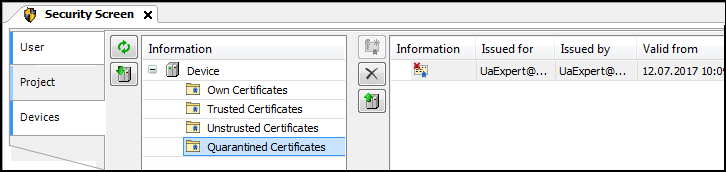
Drag the certificate to the Trusted Certificates folder.
Now the client certificate is classified as "trusted" by the server.
In the UaExpert client, click the command.
The Certificate Validation dialog opens with an error message.
Select the Accept the server certificate temporarily for this session option and click Continue.
The connection is established and objects are displayed in the Address Space view.
Using the OPC UA Client to change a variable
In the Address Space view, in the UaExpert client, expand the object.
The variables of the global variable list are visible.
Select the variables and drag them to the Data Access View.
The variables and their current values are shown.
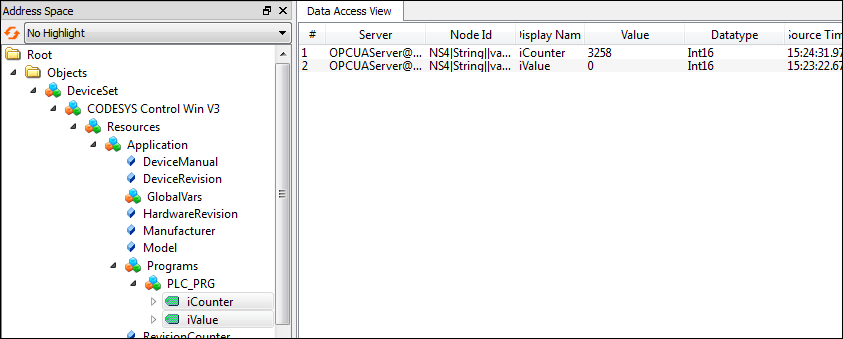
Change the variable values by double-clicking the Value field.