Using Events and Alarms
The CODESYS OPC UA Server provides the capability of sending standard OPC UA events and mapping alarms in a simplified form.
Caution
In CODESYS Communication version 4.6.0.0 (and higher) and CODESYS Development System version 3.5.21.0 (and higher), the ACK_REP acknowledgment method complies with the OPC UA standard.
All other acknowledgment methods do not meet the requirements of the OPC UA specification. In these cases, the state machines in particular are different and no comments can be assigned. The mapping of these alarms is used to provide the possibility of basic interaction between an OPC UA Client and the alarm management.
For more information about alarm management and alarm visualization, see the following: Alarm Management and Alarm Visualization
Creating alarms and events
Create a new project with a CODESYS Control Win controller.
Insert an Alarm configuration object below the application.
Add the library
CmpOPCUAProviderAlarmConfigurationto the Library Manager.In CODESYS Development System version 3.5.21.0 and higher, the
CompatibleAlarmManagerToOpcUaConnectorlibrary must be integrated instead of theCmpOPCUAProviderAlarmConfigurationlibrary.When the library is added, it connects automatically as a client to the alarm configuration and sends the events to the OPC UA Server.
Insert a Symbol Configuration object below the application.
Insert a Visualization object below the Application.
Download the project to the controller and start it.
Alarms are used and generated normally. No special steps are required here.
Implementing event calls in the IEC code
If you want to create events, then the following additional steps are required.
Insert an AlarmClass object below the Alarm Configuration. Specify a name (example:
Event).The new alarm class opens in the editor.
Select the acknowledgment method REP.
Insert an Alarm Group object below the Alarm Configuration. Specify a name (example:
ApplicationEvent).The new alarm group opens in the editor.
- . Change the following parameters:
Observation type: Event
Class: Event
Message: "Message 1"
In a program (for example, POU
PLC_PRG), add a program call for triggering the event alarm.
Call in code
AlarmManager.AlarmGlobals.g_AlarmHandler.RaiseEvent(Alm_AlarmConfiguration_Alarmgroup_IDs.ID_ApplicationEvent, Alm_ApplicationEvent_Alarm_IDs.ID_0);
Monitoring an event via the UaExpert OPC UA Client
This is how you observe and monitor occurring events via an OPC UA connection on the UaExpert client.
Start the
UaExpertprogram.Click the command.
The Add Server dialog opens.
In the tree view, expand .
Select the connection type None and click OK to close the dialog.
Click the command.
An object tree is displayed in the Address Space view.
Click the command.
The Add Document dialog opens.
Select the Event View as the "Document Type".
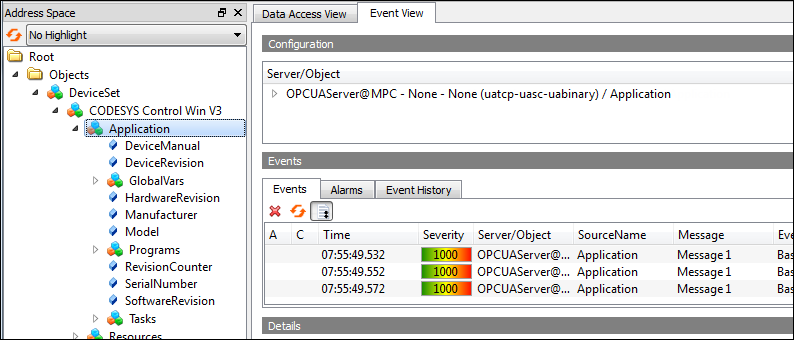
The Event View tab opens.
In the Address Space view, expand the object.
In Address Space, select the "CODESYS Control Win V3" object and drag it to the Event View.
The events are displayed.